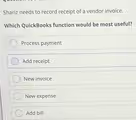
The Correct Answer and Explanation is:
The correct answer is Add bill.
In QuickBooks, terminology is very specific to ensure accurate accounting. The “Add bill” function is the most appropriate tool for recording a vendor invoice that will be paid at a later date. When a business receives an invoice from a vendor, it represents a formal request for payment for goods or services that have been delivered. This creates a short term liability for the business.
Using the “Add bill” feature accomplishes the essential task of entering this liability into the company’s books. It credits the Accounts Payable account, signifying that money is owed, and debits the relevant expense or asset account. This process allows the business to accurately track all its outstanding debts to vendors, manage payment due dates, and maintain a clear picture of its financial obligations. It is a crucial step in accrual basis accounting, where expenses are recognized when they are incurred, not necessarily when they are paid.
Let’s review why the other options are incorrect. “New expense” is used for purchases that are paid for immediately, such as buying supplies with a debit card; it does not track an amount to be paid later. “New invoice” is the function used to bill your own customers, which is the opposite of receiving a bill from a vendor. “Add receipt” is a feature for capturing and organizing proof of purchase for transactions that have already occurred, often linked to an expense or bill. Finally, “Process payment” is the step taken after a bill has been entered and you are ready to pay it. Therefore, for the initial recording of a vendor invoice, “Add bill” is the correct function.